
Owner`s manual




6. Random Access
Interlaced [On] or [Off] this selection is automatically filled when active file has to be edited. If the image is
wrong due to mismeasurement, use the ENTER key to toggle between [On] and
[Off]. (for interlaced images, 1 frame contains 2 fields).
Read AMDS AMDS = automatic mode detection & synchronization
During the installation of a file with LOAD, the system automatically measured the
horizontal period, the total vertical lines and the interlaced mode. When selecting
Read AMDS, the system remeasures the above indicated items.
How to install the correct settings for the options in the Edit file menu.
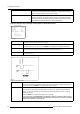
EDIT FILE OPTIONS
Source number 1
Clamp position [leading]
Clamp delay 0
Clamp width 10
Field polarity [pos]
Field select [both]
Vertical refresh [sync]
Vertical sync polarity [leading]
Select with ↑ or ↓
<ENTER> to toggle
↑ or ↓ to change value
<EXIT> to return
Menu 6-15
Source number The source number of a non-active source can be changed to any other source number. This makes
itpossibletocreateafilefo
r future source numbers.
Clamp position Clamping determines the black level of the signal. The clamp pulse can be related to the leading or
the trailing edge of the sync pulse. Use the ENTER key to toggle between [leading] and [trailing].
Clamp delay The time between the leading ed
ge of the clamp pulse and the locked edge of the sync pulse. Can be
any value between 0 and 255. Change the value by pushing the cursor key ↑ or ↓.
Clamp width The width of the clamp pulse can be any value between 0 and 255. Change the value by pushing
the cursor key ↑ or ↓.
Sync
pulse
Clamp
pulse
Clamp
delay
Clamp
width
Leading edge
Trailinging edge
Image 6-2
Example for Clamp position [trailing]
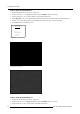
Field polarity
The field polarity function is used for interlaced images. Both rasters of the image could be shifted in a
wrong way (double lines are visible in the image). This can be corrected by forcing the field polarity to
[neg] or [pos]. Use the ENTER key to toggle between [pos] and [neg].
Field select
Default [both]
The field select is only used for interlaced images. One frame of an interlaced image contains two
fields, an even and an odd field. The choice exists to project [both] fields on the screen or only the
[even
] or [odd] field.
Use the ENTER key to toggle between [both], [even] and [odd].
If the active Stereo Compatibility Option is installed, the field select parameter will be changed
into a [left] and [right] selecting parameter which will be selectable for stereo files. This setting
will
then be saved in the active image file.
48 R5976661 BARCO TRACE 04122003