
Owner`s manual



5. Getting Started
5.3.4 Temperature error DMD
Overview
When the temperature of one of the DMD is too low or too high the projector will be switched automatically to standby. Before
switching to standby, the following message appears for 3 seconds on the screen : ’DMD out of operating temperature range.
Automatic shutdown is activated.’.
A ’-t’ appears on the LED display to indicate the user that the projector is switched to standby due to DMD temperature problems.
Operating temperature range of the DMD : +10°C and +35°C.
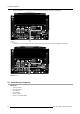
ERROR
DMD out of operating
temperature
range
Automatic shutdown is
activated
Menu 5-2
5.4 Quick Set Up Adjustments
Overview
• Quick Lens Adjustment
• Quick OSD Color Change
5.4.1 Quick Lens Adjustment
Necessary tools
Nut spinner M8
When no external Lens Adjustment Pattern is available from the source, press the shortcut * key on the RCU
to display the internal Lens Adjustment Pattern.
LENS ADJUSTMENT ZOOM/FOCUS
ZOOM with or ,
FOCUS with or
<ENTER> to shift
<EXIT> to return
Image 5-4
The internal Lens Adjustment Pattern
What can be done?
This will adjust the focus of the lens.
How to Focus the Lens?
1. Loosen the 2 bolts connecting the Top Rear Cover to
the Barco Trace. (image 5-5)
2. Remove the Top Rear Cover.
3. Adjust the Focus of the lens by turning the Focus Ring on the Lens. (image 5-6)
4. Reverse this procedure to mount the Cover back to the Barco Trace.
R5976661 BARCO TRACE 04122003
33