
Owner`s manual





8. Service Mode
8.3 Starting Up Service
How to Start Up Service?
1. Press ADJUST or ENTER key to start up the Adjustment Mode.
The Adjustment Mode menu will be displayed.
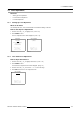
2. Push the cursor key ↑ or ↓ to highlight Service. (menu 8-1)
3. Press ENTER to select.
The Service menu will be displayed. (menu 8-2)
ADJUSTMENT MODE
Select a path from
below
RANDOM ACCESS
INSTALLATION
SERVICE
Source 1
Select with ↑ or ↓
then <ENTER>
Menu 8-1
SERVICE
IDENTIFICATION
CHANGE PASSWORD
CHANGE PROJ. ADDRESS
CHANGE BAUDRATE PC
LAMP
MORE ...
Select with ↑ or ↓
then <ENTER>
<EXIT> to return
Menu 8-2
Some items in the Service menu are password protected (when the password function is active). Enter the
password to continue. All other password protected items are now available if you stay in the adjustment
mode.
8.4 Identification Screen
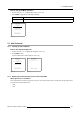
What can be seen on the Identification Screen?
The title page screen shows the general information of the projector.
The following items will be displayed:
• Type of projector: Barco TRACE
• Proj. address
• Software version
• Configuration:
- Front/Table
- Front/Ceiling
- Rear / Table
- Rear / Ceiling
• Baudrate PC: transfer speed for communication with an IBM PC (or compatible) or MAC. The baudrate of the projector must be
the same as the baudrate of the connected computer. When there is a difference, consult ’Change Baudrate PC’ in this chapter.
• Text: Indicates if the on screen text information (picture setting textboxes: contrast,...) is enabled or not
• Projector Serial number: indicates the fabrication number of the projector. This number can be useful when calling for technical
assistance.
• Projector Run Time: gives the total run time since the first start up. All projectors leave the factory with a run time of approxi-
mately 24 hours.
126
R5976661 BARCO TRACE 04122003