
Owner`s manual





7. Installation Mode
Available patterns
- Outline
-Hatch
- Color bars
- Multiburst
- Checker board
-Purity
- Page Char
- Alpha numeric char
- Character Sets
How to select an Internal Patterns?
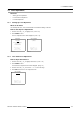
1. Push the cursor key ↑ or ↓ to highlight Internal Patterns. (menu 7-23)
2. Press ENTER to select.
The internal patterns menu will be displayed. (menu 7-24)
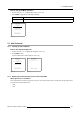
3. Push the cursor key ↑ or ↓ to select the desired pattern.
4. Press ENTER to select.
The selected pattern will be displayed.
INSTALLATION
INPUT SLOTS
NO SIGNAL
LENS
MENU POSITION [CENTER]
800-PERIPHERAL
CONFIGURATION
OSD COLOR
INTERNAL PATTERNS
Select with ↑ or ↓
then <ENTER>
<EXIT> to return
Menu 7-23
INTERNAL PATTERNS
OUTLINE
HATCH
COLOR BARS
MULTIBURST
CHECKER BOARD
PURITY
PAGE CHAR
ALPHA-NUMERIC CHARS
CHARACTER SETS
Select with ↑ or ↓
then <ENTER>
<EXIT> to return
Menu 7-24
124 R5976661 BARCO TRACE 04122003