
Owner`s manual





7. Installation Mode
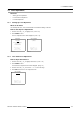
4. Press ENTER to confirm.
The Projector will display the image according to the selected configuration.
5. Press EXIT to return to the Installa tion menu.
INSTALLATION
INPUT SLOTS
NO SIGNAL
LENS
MENU POSITION [CENTER]
800-PERIPHERAL
CONFIGURATION
OSD COLOR
INTERNAL PATTERNS
Select with ↑ or ↓
then <ENTER>
<EXIT> to return
Menu 7-19
CONFIGURATION
FRONT/TABLE
FRONT/CEILING
REAR/TABLE
REAR/CEILING
Select with ↑ or ↓
<ENTER> to accept
<EXIT> to return
Menu 7-20
7.9 OSD Color
OSD = On Screen Display
What can be done?
The highlighted items in the menu can be displayed in:
•Red
• Green
•Yellow
How to change the OSD Color ?
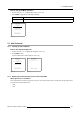
1. Push the cursor key ↑ or ↓ to highlight OSD Color. (menu 7-21)
2. Press ENTER to select.
The OSD color menu will be displayed. (menu 7-22)
3. Push the cursor keys to select the desired color.
4. Press ENTER to select.
5. Press EXIT to return to the Installation Mode menu.
INSTALLATION
INPUT SLOTS
NO SIGNAL
LENS
MENU POSITION [CENTER]
800-PERIPHERAL
CONFIGURATION
OSD COLOR
INTERNAL PATTERNS
Select with ↑ or ↓
then <ENTER>
<EXIT> to return
Menu 7-21
OSD COLOR
HIGHLIGHTED ITEM
RED
GREEN
YELLOW
Select with ↑ or ↓
<ENTER> to accept
<EXIT> to return
Menu 7-22
7.10 Internal Patterns
What can be done?
The projector is equipped with different internal patterns which can be used for measurement purposes.
R5976661 BARCO TRACE 04122003
123