
Owner`s manual





7. Installation Mode
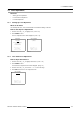
LENS ADJUSTMENT ZOOM/FOCUS
ZOOM with or ,
FOCUS with or
<ENTER> to shift
<EXIT> to return
Image 7-1
Zoom/Focus adjustment menu
7.5.3 Lens Shift Adjustment
How to adjust the Horizontal/Vertical Shift?
1. Push the cursor key ↑ or ↓ to highlight Shift. (menu 7-13)
2. Press ENTER to select.
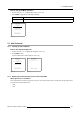
The Shift Adjustment menu will be displayed. (image 7-2)
3. Push the cursor key ↑ or ↓ to shift the image up or down and ← or → to shift the image left or right.
4. Press EXIT to return to the Lens Adjustment menu.
5. Press EXIT to return to the Installa tion menu.
LENS ADJUSTMENT
ZOOM/FOCUS
SHIFT
Select with ↑ or ↓
<ENTER> to select
<EXIT> to return
Menu 7-13
LENS ADJUSTMENT SHIFT
SHIFT with or , or
<ENTER> to zoom/focus
<EXIT> to return
Image 7-2
7.6 Changing the Menu Position
What can be done?
The Menu can be displayed in the bottom right corner or the center of the displayed image.
120
R5976661 BARCO TRACE 04122003