
User Manual




Delete a name or number in the
Phonebook
You can delete names and numbers stored in
the Phonebook.
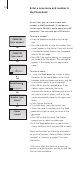
Delete one number …
> Push the Track point up or down to select the
name.
> Press OK to be able to select a number type.
> Push the Track point down to select a number
type and press OK to view your options.
> Push the Track point down until Delete?
appears in the display and press OK to delete
the number.
Delete a name and all the numbers stored
with it …
> Push the Track point up or down to select the
name.
> Press OK to view your options.
> Push the Track point down until Edit? appears
in the display and press OK to view your
options.
> Push the Track point down until Delete all?
appears in the display and press OK. The
selected name and all the numbers stored with
it are deleted.
David Jones
Mobile
34567890
OK
OK
Mobile
Delete?
Mobile
deleted
OK
David Jones
David Jones
Delete all?
OK
David Jones
Edit?
OK
OK
David Jones
deleted
18