
User Manual


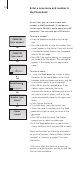


To edit a name …
> Push the Track point up or down to select the
name and press OK to view your options.
> Push the Track point down until Edit? appears
in the display and press OK to view your
options.
> Push the Track point down until Rename?
appears in the display and press OK.
> If the name is correct, press OK. Otherwise…
> …push the Track point left or right to select
the letters for the name.
> Press OK to store the selected letter. If you
store an upper case letter, the cursor
automatically moves to the lower-case letters. If
you store a space or symbol, such as ‘&’, the
cursor automatically moves to the upper-case
letters.
> Press C to delete the letter to the left of the
cursor.
> Finish ‘typing’ the name.
> To include digits, press the number keys.
> When the name is complete, push the Track
point left or right to move the cursor to the
symbol.
> Press OK to store the name.
If you wish to enter an additional number for the
same person in the Phonebook, you must enter a
new number as described on page 14. An edited
entry replaces the previous entry in the
Phonebook.
OK
Dave Jones
Rename?
David Jones
stored
OK
Dave Jones
Edit?
C
OK
Dave Jones
A
a
abcdefg...
Dav
A
a
abcdefg...
OK
David Jones
. . .
David Jones
A
a
abcdefg...
Dave Jones
OK
17