
User Manual


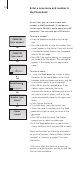


To add a number to a name in the
Phonebook…
> When the display prompts you to store a new
name, push the Track point down to select
Add to name? and press OK. The first letters of
names stored in the Phonebook appear in the
display.
> Push the Track point left or right to select the
first letter of a name and press OK. The first
name beginning with the selected letter
appears in the display.
> Push the Track point up or down to select the
name and press OK to be able to select a
number type.
> Push the Track point down to select Home,
Mobile or Work and press OK to store it.
OK
23456789
Add to name?
Number type
Home?
Home
stored
OK
David Jones
ADEGHKOPST...
First letter:
ADEGHKOPST...
First letter:
OK
OK
15