
Technical data






Setup Mode ◆ Report Screen
34 310633C
Report Screen
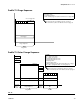
The Report Screen shows the most recent 10 alarms,
with the date and time. Use the or keys to see
all the alarms. The grand total of components A and B is
displayed in liters or gallons, based on the units set in
Advanced Screen 1. Grand total cannot be reset.
There are no selectable settings on the Report Screen.
Calibrate Screen
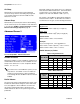
Use this screen to calibrate a meter.
• Start - start calibration
• Abort - stop calibration
• Purge - purge sampling valves after calibration
See Meter Calibration, page 49, for when and how to
calibrate meter.
F
IG. 36: Setup Mode - Report Screen
The optional ProMix™ II Data Download Kit
234668 enables you to download and view the
most recent 100 alarms or events.
FIG. 37: Setup Mode - Calibrate Screen