
User guide



99
Maxtor Central Axis Admin User Guide
Checking System Status
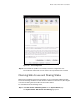
The System Status page provides complete information about the status of your Central
Axis.
To open the System Status page,
• Click System Status in the Main Menu or click the System Status icon at the top
of the Central Axis admin web page.
The System Status page opens:
Figure 150: System Status