
Operating Instructions and Installation Instructions

Buttons
FRITZ!Box 3390 9
2.2 Buttons
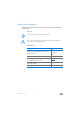
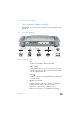
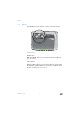
The FRITZ!Box has two buttons on the top of the housing.
FRITZ!Box buttons
WLAN Button
With the “WLAN” button you can turn the wireless LAN func-
tion on and off.
“WPS” Button
With the “WPS” button you can connect wireless devices with
the FRITZ!Box by WPS. WPS is an easy way to establish secure
wireless connections (see page 23).
WLAN
WPS
Power
LAN
WLAN
DSL
Info
WLAN
W
P
S
Po
w
er
LAN
WLAN
D
SL
Inf
o
WLAN
WPS