
Operating Instructions and Installation Instructions

FRITZ!Box 3390 24
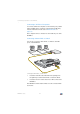
Connecting Computers over Wireless LAN
WPS with the PIN Method
If your wireless LAN device supports WPS, but does not have
a button to start the push method nor any possibility to en-
able it in its control software, use the PIN method to establish
the wireless LAN connection.
You can choose between two methods:
• the FRITZ!Box specifies the PIN
• the wireless LAN device specifies the PIN.
The FRITZ!Box Specifies the PIN
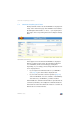
1. Open the FRITZ!Box user interface.
2. Select the “WLAN / Security” menu.
3. Go to the “WPS Quick Connection” page.
4. Enable the setting “WPS enabled”.
5. Select the option “PIN method (WPS-PIN), the FRITZ!Box
specifies the PIN”.
6. The PIN will be displayed. Enter this PIN in the control
software of the wireless LAN device.
7. Click “Start WPS”.
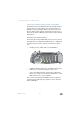
The “WLAN” LED on the FRITZ!Box flashes slowly, indicating
that the WPS procedure has begun. Now a secure wireless
LAN connection is being established between the FRITZ!Box
and the wireless LAN device.
The Wireless LAN Device Specifies the PIN
1. Open the FRITZ!Box user interface.
2. Select the “WLAN / Security” menu.
3. Go to the “WPS Quick Connection” page.
4. Enable the setting “WPS enabled”.
5. Select the option “PIN method (WPS-PIN), the wireless
device specifies the PIN”.