
Operating Instructions and Installation Instructions

FRITZ!Box 3390 20
Connecting the Computer to the FRITZ!Box
5 Connecting the Computer to the FRITZ!Box
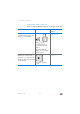
You can connect a computer with the FRITZ!Box either using a network
cable or over wireless LAN.
5.1 Connecting Computers to the LAN Port
Connecting a computer using a network cable
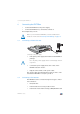
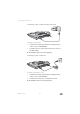
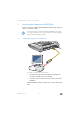
1. Insert the network cable included in the package into
the network (LAN) port of the computer.
2. Insert the free end of the cable into a LAN socket on the
FRITZ!Box.
Now the FRITZ!Box and the computer are connected with each
other.
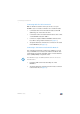
A computer can be connected with the FRITZ!Box using only
one of these methods. It is not possible to connect using the
network cable and wireless LAN.
LAN 2
LAN 2
LAN 2
LAN 3
LAN 3
LAN 4
LAN 4
Power
Power
Power
WLAN
LAN
DSL
Info
DSL
DSL
LAN 1
LAN 1
WPS
W
LAN