
Operating Instructions and Installation Instructions

Connecting to the Internet
FRITZ!Box 3390 17
Connecting to a DSL or VDSL Line with a Fixed Line
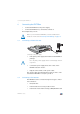
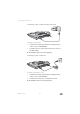
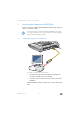
Connecting to the DSL splitter
1. Insert the DSL cable included in the package into the
“DSL” socket on the FRITZ!Box.
2. Insert the free end of the cable into the DSL socket on
the DSL splitter.
On the FRITZ!Box the “Power” LED lights up.
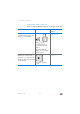
Connecting to a DSL or VDSL Line
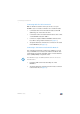
Connecting to the telephone socket
1. Insert the DSL cable included in the package into the
“DSL” socket on the FRITZ!Box.
2. Insert the DSL cable into your telephone socket.
On the FRITZ!Box the “Power” LED lights up.
LAN 2
LAN 2
LAN 3
LAN 3
LAN 4
LAN 4
Power
Power
Power
WLAN
LAN
DSL
Info
DSL
DSL
LAN 1
LAN 1
WPS
W
LAN
LAN 2
LAN 2
LAN 3
LAN 3
LAN 4
LAN 4
Power
Power
Power
WLAN
LAN
DSL
Info
DSL
DSL
LAN 1
LAN 1
WPS
W
LAN