
Operation Manual




Installing Alice
Alice – 2 Installing Alice 9
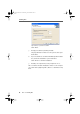
Input window for the Product Identification Code
6. The window for ISDN configuration opens. If your ISDN-
Controller is connected to a PBX, select the option “Op-
eration at a PBX”. When this option is active, you must
fill out the fields below it.
Under “Outside line access” enter the number used by
your PBX to obtain an outside line, usually “0”.
In the “Minimum length of external numbers" field, en-
ter the minimum number of digits that must be dialed
to reach an outside line. For example, if extension num-
bers on your PBX have three digits, enter “4”.
In the “My MSN” field, enter the number on which Alice
is to accept incoming calls. This MSN is also the num-
ber for outgoing calls (outgoing caller ID).
Enter the charge for a single unit of transmission from
your ISDN provider in the “Charge unit” field.
alice-e.book Seite 9 Dienstag, 29. Juli 2003 2:50 14