
Operation Manual




Sound Card Information
8 Alice – 2 Installing Alice
2.2 Sound Card Information
Alice can be operated with a number of different sound
cards. You can use either headsets (headphones combined
with a microphone) connected directly to a sound card or
desktop speakers combined with a separate microphone.
AVM recommends using a headset to ensure that transmis-
sion is as free of distortion as possible.
Make sure that your sound card has full duplex capability,
i.e., that it can send and receive audio data at the same
time. Newer cards tend to be duplex capable, but frequently
this feature must be activated in the driver settings. For most
sound cards, this setting must be made in the Windows De-
vice Manager. For more information on this subject, see the
manual of your sound card.
2.3 Installing Alice
If the installation requirements are fulfilled, Alice can be in-
stalled on your computer. Proceed as follows:
1. Start the installation by double-clicking the SETUP.EXE
file in the ALICE folder on the CD.
The Installation Wizard starts.
2. Click “Next” to continue the installation.
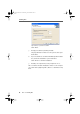
3. In the next window, enter the folder in which Alice is to
be installed.
Click “Browse” to specify another path.
4. Click “Next” to continue the installation.
5. In the next window you will be prompted to enter the
Product Identification Code. This code is printed on the
back of your CD jewel case. Confirm your entry by click-
ing “OK” and then confirm that you want to install Alice
by clicking “OK” again.
alice-e.book Seite 8 Dienstag, 29. Juli 2003 2:50 14