
Operation Manual




Installing Alice
10 Alice – 2 Installing Alice
Information for operation at a PBX
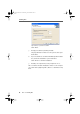
Click “Next”.
7. Accept your entries by clicking “Install”.
The program files for Alice are now copied to the speci-
fied folders.
8. If you would like to use Alice immediately after installa-
tion, leave the “Start Alice” option activated.
Click “Finish” to end the installation.
9. Restart your computer if you are prompted to do so.
This concludes the Alice installation. Alice is now ready for
use. Click “Start / (All) Programs / Alice” to start Alice at any
time.
alice-e.book Seite 10 Dienstag, 29. Juli 2003 2:50 14