
User`s manual


E-48
Maintenance
5
Resetthelampusagetime
Please perform the operation indicated below in the standbymode (*).
6
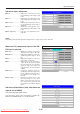
Checkthat theindication ofthe lamp us-
age time has become“0 H” as illustrated
inthediagramtotheright.
If the usage time has not been reset, please reset it by
following Step 5 again.
Check the lamp usage time by pressing the menu button of
the remote control to display the menu, then use the scroll
◀▶ button to display the setup setting.
OperationwiththeProjector
Press the INPUT, PORTRAIT, FREEZE OFF and FREEZE/CAPTURE buttons si-
multaneously, then press the input selector and still picture buttons simultaneously.
OperationwiththeRemoteControl
Resetting of the lamp usage time cannot be performed with the remote control.
TheLAMP/COVERLEDwillashgreenfollowingthisandprojectionwillstart.
* The power plug is plugged into a power outlet and only the ON/STANDBY LED is lit red.
CAUTION
• Ifthelampisusedwithoutresettingtheusagetime,thecorrectlampusagetimewillnotbeknown;
therefore, be sure to reset the usage time after lamp replacement. When the indication exceeds 2000
hours, the projector will be forced to turn off the projection lamp.
NOTE:
• Intheinterestofsafety,thelampwillnotlightwhenthelampunitcoverisoff.
• Likeuorescentbulbsforhomeuse,thelampunitcontainsatraceamountofmercury.Whendisposingofit,dosofollowing
thesameregulationsinplaceinyourcommunityasforuorescentbulbs.
CAUTION
• Donotresetthelampusagetimewithoutreplacingthelamp.
The likelihood of the lamp rupturing becomes higher when the lamp has been used in excess of 2000
hours.
Downloaded From projector-manual.com Avio Manuals