
User`s manual


E-43
Menu Description
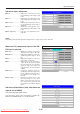
Language selection .........Selects from among the following
languages the language for use in
the menus and message indica-
tions: Japanese, English, German,
French, Spanish, Italian, Chinese,
and Korean.
Projection mode ...............Selects the projection system of the
projector from between Front (front
projection) and Rear (rear projec-
tion).
Economy mode ...............ON(Economymode):
The brightness of the lamp will be
approximately 80%. The lamp ser-
vice life will be extended.
OFF(Highbrightnessmode):
The brightness of the lamp will be
100%. There will be a bright screen.
Auto power off ..................When this is set to “ON”, the lamp
turns off if the projector is in the “No
Sync” mode for 15 minutes when
the input is set to PC/component
video or VIDEO.
Tandem operation ............When “ON” is selected, operation is
as described below.
1. When the FREEZE/CAPTURE
button is pressed while the OHP/
VIDEO image is being projected,
the OHP image is captured and
the image automatically switches
to the PC display.
2. When the FREEZE/CAPTURE
button is pressed while the PC
display is being projected, the
OHP image is captured.
NOTE:
• Whenkeystonecorrectionhasbeenapplied,theresolutionatthescreenedgeswilldegradeandsmallcharactersandthelike
will become difficult to see. When you do not wish to have the resolution degradation, set the projector on a level platform and
set the numerical value of the Keystone menu to “0” (no correction).
• Compared towhen keystonecorrection is not applied, the application of keystone correctionresultsin a displayimage (of
characters, etc.) that appears somewhat blurred and this is related to the image processing that is performed.
• ThemaximumapplicationofkeystonecorrectionwhenaresolutionlessthanVGAresolution(of640×480dots)isdisplayed
might result in the disappearance of a portion of the image. Please see Page E-19 for details.
• Thekeystonecorrectionadjustmentrangewilldifferdependingonthevideosignalsystem.
• Whenthe keystoneadjustment is performed manuallywhile the automaticadjustment is set to“ON”, the adjustment made
manually is effective, but the automatic adjustment setting remains “ON”.
If the projector is strongly tilted after the adjustment is made manually and the projector is restarted, the adjustment that was
made manually is invalidated and the automatic adjustment function becomes effective. If you wish to keep the adjustment
made manually, set the automatic adjustment to “OFF” after making the manual adjustment.
Downloaded From projector-manual.com Avio Manuals