
User`s manual





E-36
Method of Menu Operation
Menu Operation Method
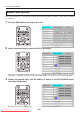
This section describes the actual operation method. Adjustment of [Brightness] using the remote control is provided
as an example.
1
PresstheMENUbuttonanddisplaythemenu
2
Select[Imageadjustment]withtheSCROLL◀▶buttons
Each press of the SCROLL ▶buttonswitchesthemenuonestepinthesequenceof[Pointer•Screen]→ [Image
adjustment] → [Settings], and each press of the SCROLL ◀ button causes a return in the opposite direction.
3
Display the detailed menu with the SCROLL ▼ button or the SET/POINTER button,
thenselect[Brightness].
Move the cursor and select [Brightness].
Downloaded From projector-manual.com Avio Manuals