
User`s manual





E-34
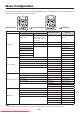
Menu Configuration
The adjustment/setting items and content will differ depending on the input selection and the permitted information
will be displayed on the menu for that input mode.
Pointer•Screen
Imageadjustment Settings
OHP input
Pointer•Screen Historymenu
Pointer shape
Back page in history
Next page in history
(in the single sheet dis-
play mode)
Red Keystone
Pointer color Erase entire history Blue Language selection
Pointer size Erase 1 sheet in history Color mode Projection mode
Mute mode Economy mode
Storage image quality Auto power off
Angle of rotation selec-
tion
Tandem operation
History image transfer Lamp usage time
USB Format Input signal
PC input (RGB)
Pointer shape Contrast Keystone
Pointer color Brightness Language selection
Pointer size Red Projection mode
Mute mode Blue Economy mode
Computer input Sharpness Auto power off
Aspect Ratio Tandem operation
Color mode Lamp usage time
Sync adjustment Input signal
PC input (component)
Pointer shape Contrast Keystone
Pointer color Brightness Language selection
Pointer size Color Projection mode
Mute mode Hue Economy mode
Computer input Sharpness Auto power off
Aspect Ratio Tandem operation
Color mode Lamp usage time
Sync adjustment Input signal
VIDEO input
Pointer shape Contrast Keystone
Pointer color Brightness Language selection
Mute mode Color Projection mode
Pointer size Hue Economy mode
Sharpness Auto power off
Aspect Ratio Tandem operation
Color mode Lamp usage time
Video select Input signal
NOTE:
• The“Imageadjustment”and“Settings”menuscannotbeperformedwhenthehistoryimagesaredisplayed.
Pointer•Screen Image adjustment
Settings
Downloaded From projector-manual.com Avio Manuals