
User`s manual





E-31
6
Projectiononthefullscreen
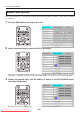
Press the SET/POINTER button of the remote control.
The reduced image at the cursor position is projected on the full projec-
tion screen of the projector.
7
Choosingtheotherimage
Press the remote control THUMBNAIL button and return to the le
list display. To choose another image in the folder, press the Scroll
▲▼◀▶ button.
To return to the folder list, press the THUMBNAIL button again.
Start operation with step 3 to choose an intended image.
8
Projecting/terminatingtheOHPimage
PresstheremotecontrolFREEZEOFFbuttonorOHPbutton.
See Page E-12 for information about removal of the USB memory
stick.
NOTE:
When using the PC to perform operations on the image data on the USB
memory stick, handle the data copied from the USB memory stick to pre-
vent it from becoming unreadable on the projector after the operation.
When feeding a page, choose the menu “Next.”
The operation can also be changed with the VOLUME + and VOLUME −
buttons of the remote control.
* When the zoom is at the minimum, pressing the SCROLL
button
permits switching to the image before the displayed image, and press-
ing the SCROLL
button permits switching to the next image.
12
34
56
78
9
10
11 12
13 14
15 16
12
34
56
78
9
10
11 12
13 14
15 16
Operationwiththe
RemoteControl
Operationwiththe
Projector
FREEZE/CAPTURE
LED (light off)
Operationwiththe
RemoteControl
Operationwiththe
RemoteControl
Onscreenoperation
Regular Operation
ON/STANDBY
LAMP/COVER
TEMP
FREEZE/CAPTURE
PORTRAIT
INPUT
FREEZE OFF
OperationwiththeProjector
Volume adjustment cannot be made at the operation
panel of the projector.
OperationwiththeRemoteControl
Adjust using the VOLUME (+/−) buttons.
Volumeadjustmentbar
Adjusting the Volume
Effective only During PC and VIDEO Input
NOTE:
If no operation is performed for several seconds
while the volume adjustment bar is displayed,
the volume adjustment bar turns off.
The PC and VIDEO volume can be adjusted in-
dependently.
Downloaded From projector-manual.com Avio Manuals