
User`s manual




E-18
CAUTION
ConnectionPrecautions
• Toprotectthisprojectorandtheequipmenttobeconnected,switchoffthepowerofeachunitbefore
making connections.
• Pleasereadthe variousequipmentinstruction manualsforinformation about the connection of the
equipment and the method of use.
• WhenconnectionismadewithanotebookcomputerandtheimageisdisplayedontheLCDscreen
of the notebook computer, a proper display might not be obtained on projection screen. Switching off
the display of the notebook computer will result in a proper display. The method of switching off the
display of the notebook computer will differ depending on the PC manufacturer. Please read the in-
struction manual of the notebook computer for details.
• Connection might not be possibly depending on the model and settings of the personal computer.
Please contact your dealer of purchase for further information.
• TheimageofthePCcannotbeprojectedwhiletheUSBcableisconnected.ConnectthePCconnec-
tion cable.
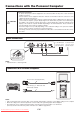
Connections with the Personal Computer
Basic Connections
Connections with Personal Computers
NOTE:
• AfterconnectingthePCconnectioncable,settheexternaloutputandthecomputer’sscreendisplaysettingsonthecomputer.
• Whenthesettingsoftheexternaloutputhavenotbeenmade,“Nosignalbeinginput”willbedisplayed.
• Thelampturnsoffifnosignalisbeinginputandnooperationhasbeenperformedforover15minutes.
(This only functions when the auto power off mode is set to “ON”. See page E-43.)
To the RGB output
connector of t h e
personal computer
To the audio output
connector of t h e
personal computer
Plug in the connection cable
and fasten with the screws
NOTE:
• InputConnectors→ See Page E-10.
PC connection cable (Supplied item)
Stereo mini plug - to - RCA audio cable
(Commercially available)
Downloaded From projector-manual.com Avio Manuals