
Corp. Dual Screen Video Processor User's Guide

www.avenview.com
17
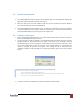
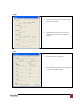
Zoom:
1. Select the main or sub channel
2. Default: Restore the selected channel
without zoom effect
3. Slider controls the ratio of zoom.
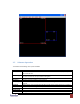
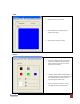
Pattern:
1. While the “Pattern Model” is chosen, the
output will display the selected pattern.
While unselecting this item, the output
display works normally.
2. The organ border indicates which pattern is
currently selected. Users can choose one of
the provided patterns by moving cursor
and clicking at the desired one
3. Users can define the pattern’s color by
changing Red, Green and Blue values