
Stackable Switch User's Guide

Avaya P332MF User’s Guide 39
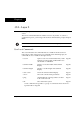
Chapter 6
CLI – Layer 2
This chapter provides all the Layer 2 CLI commands, parameters and their default
values.
The CLI is command-line driven and does not have any menus. To activate a
configuration option, you must type the desired command at the prompt and press
Enter.
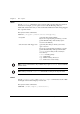
Note: The terms “module” and “switch” are used interchangeably.
User Level Commands
This section describes all commands that are available from the User level.
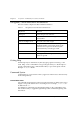
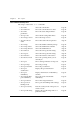
Following is a table of the User Level commands and command groups (all
commands are also available at the higher levels).
• session Opens a session to another P330 switch, X330
ATM Access sub-module, X330 WAN Access
sub-module or G700 MGP.
Page 40
• terminal width Displays or sets the width of the terminal
display.
Page 40
• terminal length Display or set the length of the terminal
display.
Page 40
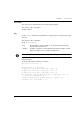
• clear screen Clears the current terminal display. Page 41
• show
1
1 This command corresponds to a group of commands and is shown in a
separate Table on Page 42.
Shows the current switch parameters. Page 42
•ping Sends ICMP echo request packets to another
node on the network.
Page 41
•dir Show files in the system. Page 79