
User Manual



Use the headphone independently with cellphone
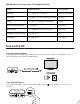
Headphone AS9S can be separately used with cell phone, please follow the step-by-step instruction
below:
• Ensure the transmitter is o.
• Enter the headphones into PAIRING MODE - from its OFF state, press and hold the MFB for 5 seconds
until the LED ashes RED and BLUE alternately, and you hear “Pairing” from the headphones.
• Turn on Bluetooth on your smart phone/tablet. Find & select “AS9S” to pair and connect.
The next time, you want to use your headphones in this way you will need to select “ Avantree AS9S”
on your smart phone /tablet to reconnect.
8
Bluetooth
Settings
Bluetooth
Devices
Avantree AS9S
PAIRING
LED ashes RED and BLUE