
User Manual



TVs with OPTICAL audio out
After turning on HT4189 and connecting cables, you should be able to hear sound from your head-
phones; if not,
• Ensure your TV speaker is set to “External Speaker”.
• Ensure TV audio format is set to “PCM” or “Dolby/DTS” is OFF(This is IMPORTANT)
Note: Setting menu may be dierent depending on dierent TV brands and model.
TV s with AUX 3.5mm Audio Out
4
Turn on the headphones – Press and hold for 2 seconds until you see the rst sight of BLUE light.
They will auto-reconnect, indicators are: 1) Headphones say “Connected”. 2) close to A on the trans-
mitter and LED on headphones turn SOLID BLUE.
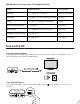
Use HT4189 with your TV
Check your TVs output options before the set up
HT4189 works with OPTICAL output, AUX 3.5mm output, and RCA (labeled “AUDIO OUT”) output.