
User Manual

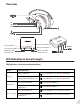
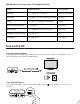


LED indicators & voice prompts of headphones(AS9S)
Turn on HT4189
Powering up transmitter
Powering up the transmitter with the USB cable provided. Connect it either to a TV USB port or any
other USB charger that supports 5V/500mA-2A.
Turn on both devices
Turn on the transmitter – Slide on/o switch to “ON” position, close to A ashes BLUE once per 2
seconds.
3
Turn on the headphones – Press and hold for 2 seconds until you see the rst sight of BLUE light.
They will auto-reconnect, indicators are: 1) Headphones say “Connected”. 2) close to A on the trans-
mitter and LED on headphones turn SOLID BLUE.
Use HT4189 with your TV
Check your TVs output options before the set up
HT4189 works with OPTICAL output, AUX 3.5mm output, and RCA (labeled “AUDIO OUT”) output.
Connected
Turn SOLID BLUE
Turn SOLID BLUE