
User Manual

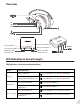


LED indicators & voice prompts of headphones(AS9S)
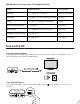
Turn on HT4189
Powering up transmitter
Powering up the transmitter with the USB cable provided. Connect it either to a TV USB port or any
other USB charger that supports 5V/500mA-2A.
Turn on both devices
Turn on the transmitter – Slide on/o switch to “ON” position, close to A ashes BLUE once per 2
seconds.
2
Power O
Pairing
Connected with Audikast
Reconnecting
Charging/charging complete
Low battery RED LED ashes
Voice prompt
Low battery
Power On
Status LEDs indication
RED and BLUE LED ashes alternately
ConnectedBLUE LED on
BLUE LED is on for 1 second
RED LED is on for 2 seconds, then turn o
RED LED on/o
Pairing
Welcome to Avantree
Good bye
BLUE LED ashes once per 2 seconds Connected
NA