
User manual

page 7 of 15
21016 SMU1-MPAB3 V1.3.doc
SMU1 Overview
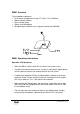
The microphone comprises;
• Desk mount microphone unit with PTT (Press To Talk Button)
• Speak indicator (Green)
• Busy indicator (Red)
• Goose neck Microphone
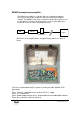
• Microphone pre-amplifier unit in separate junction box (MPAB3)
SMU 1
SMU1 Operating instructions
Operation LIVE broadcast
• When the SMU is idle the red LED will show if the system is busy.
• To make an announcement the user is to press and hold the Speak button.
Until this point announcer has had no effect on the PA system.
• A rapidly flashing green LED by the Speak button, indicates that the pre-
announce chime is active and the announcer should wait until this green
LED stays solidly on. This is the Speak-now indication.
• Whilst holding the Speak button, the announcer should then talk steadily
and clearly into the microphone with their mouth about 10 to 20 cm. from
the microphone head.
• The call ends when the announcer releases the Speak button, thereby
turning off the microphone, indicated by the Green LED’s turning off.