
Owner`s manual





111
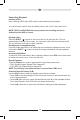
Menu Page 1
• Elapsed Time Indicator: Displays the total playing time and elapsed of the current
movie playing.
• icon: Touch to select a chapter/track directly using the on-screen display direct
entry menu display.
• icon: Touch to stop DVD playback.
• icon: Touch to move to previous chapter.
• (Pause / Play ) icon: Touch the icon to pause playback. Touch the icon to
begin playback.
• icon: Touch to advance to the next chapter on the DVD.
• Mute icon: Press this icon to mute the audio output of the unit. Press again to un-
mute the volume.
• icon: Touch to go to Menu Page 2.
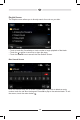
Menu Page 2
• icon: Touch to select a chapter/track directly using the on-screen display direct
entry menu display.
• A-B icon: Touch to repeat a specic portion from point A to point B of the
DVD disc.
• Angle icon: Touch to view angles if the DVD contains scenes shot from different
angles.
• Audio icon: Touch during playback to select to select the audio language. Each
time the icon is touched a different audio language is selected if you are watching
a disc recorded in multiple languages.
• Subtitle icon: Touch during playback to select the subtitle language if the disc is
recorded in multiple languages. Each time the icon is touched a different subtitle
language is selected. The subtitle function can also be turned on or off.
• Repeat icon: Touch during playback to repeat the current chapter. Touch the icon
a second time to repeat the current title. Touch the icon a third time to turn the
repeat function off.
• icon: Touch to go to Menu Page 1.