
Car Video System User Manual



MENU ADJUSTMENT
The System Menu contains features and options that allow you to customize your
system.
1) Press the “ ” button on unit or press the TV button and the SYSTEM MENU
button on the remote control, the menu display below will appear on screen.
2) Use the “+” “-” buttons to change the setting .
3) To select the next menu press the “ ” button or the SYSTEM MENU button on the
remote control.
MENU DISPLAY
The first adjustment to appear is the volume adjustment. The volume can be adjusted
from 1 to 32.
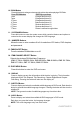
The picture can be adjusted under the system menu. The picture adjustments consist
of brightness (BRIGHT), CONTRAST, COLOR, TINT (for NTSC only). The
adjustments range from 1 to 32.
The screen mode select feature allows the user to change the screen format (aspect
ratio from 4:3 or to 16:9).
The IRT can be set to Channel A or Channel B for use with optional wireless
headphones. The IRT function can also be set to off.
SCREEN MODE 16:9
AVXMTGHR1D
14
16
BRIGHT 16
CONTRAST 16
COLOR 16
TINT 0
IRT A