
Owner's Manual


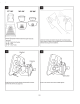


Table Of Contents

·
···
·····
-----·--·-···---
··
·---
--
-
--·-
··
···-
·--·
------------
·
··
··-
-
···
---·-·
··
··--
···
-
..
- I
·-··- ·--
·--
··-·
····
....
···
-·-···--
···-
----··-·
···········
---·······--
\
Do
NOT
take
off
two
way tape liner. Hold camera bracket
with
camera
up
to
mounting
location
to
test location chosen.
Dry
fit
camera in location.
Tips!
Ensure camera cover does
not
interfere
with
vehicle
interior
.
Ensure coax cable can reach and can be tucked
out
of
the
way
.
Using masking tape, mark
the
location
at
which you
would
like
to
mount
the camera.
Do
NOT
take
off
two
way
tape. With vehicle
ignition
on
and
mirror
in
display mode
point
the
camera. Choose location
that
image
looks best
in
mirror's display.
Tips!
Ensure camera image
is
level.
Ensure camera can
point
at
horizon.
7/9
Double check
mounting
location. Remove
two
way
tape liner.
Ensure debris
or
hand oils
do
not
get
on
two
way
tape.