
User`s manual




39
one
Track T
ime
Track min sec
► 09 08 : 26
► Playback Opt
ions
◄
Set Random Playback:
enabled
Note
· If you compiled a playlist, not the whole disc but only the tracks of
the playlist are repeated.
· You may switch on/off the repeat function before and during play-
back.
· In case you activated the disc repeat and the random play function, all
tracks are played back in random order until every track was played
once. Then the playback re-starts with a randomly chosen track.
9.2.2 Repeat track
If you would like to repeat only one track of a disc, select option Re-
peat Track. The track repeat mode is indicated by the sym-
bol one in the display.
The current track will be looped until you switch off the track repeat
function or stop playback.
To deactivate the track repeat function select option Repeat dis-
abled. The track repeat symbol one is now removed from the dis-
play.
Note
· You may switch on/off the repeat function before and during play-
back.
· In case you activated the track repeat and the random play function,
only the current track will be repeated nonetheless.
9.3 Random playback
Use this function to playback the tracks of a disc or playlist in a randomly
order.
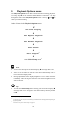
Press the setup key ä on the Audionet Metal Remote Control RC 1 3
times to get to the Playback Option Random Playback.