
User`s manual




38
Total Time
Track min sec
► 05 17 : 55
all
Track Time
Track min sec
► 19 32 : 17
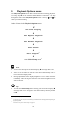
► Playback Options ◄
Set Repeat Playback:
Repeat disabled
Total Time is the total playback time of the current disc.
Note
· During playback of a playlist the total playback time of the playlist
Prog. Time is displayed instead of the total playback time To-
tal Time of the current disc.
Tip
· To leave the menu press and hold setup key ä for longer than 2 sec.
9.2 Repeat Playback
If you would like to repeat the currently inserted disc or just a single
track, press the setup key ä on the Audionet Metal Remote Control RC 1
twice to get to the Playback Option Repeat Playback.
Use keys 9 and : to select the desired Repeat Playback function. Se-
lect Repeat disabled to switch off the Repeat Playback function.
9.2.1 Repeat disc
If you would like to repeat the currently inserted disc, select Repeat
Disc. The display indicates the disc repeat mode with symbol all.
As soon as the end of the disc is reached, playback resumes at the start of
the disc. The disc will be repeated until you switch off the disc repeat
function or stop playback.
To deactivate the disc repeat function select option Repeat dis-
abled. The repeat symbol all is now removed from the display.