
User`s manual





28
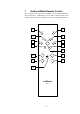
7.1 Key Assignment RC 1
No.
Key Function
1
ART power on/off ART G3
2
PRE
power on/off Audionet preamplifier
3
9
skip to previous track
4
:
skip to next track
5
ä
enter/navigate Global Setup & Playback Options menu
6
■
stop playback
7
7
search backwards
8
8
search forwards
9
► / ;
start/resume playback; press long for pause
10
CH + select next input channel of Audionet preamplifier
11
CH - select previous input channel of Audionet preamplifier
12
VOL +
increase volume of Audionet preamplifier
13
VOL - decrease volume of Audionet preamplifier
14
mute/un-mute Audionet preamplifier
1 Power key ART for ART G3
Use the power key ART to switch on/off the ART G3. This key has
the same function as the power key on the front panel. If the
ART G3 is in stand-by mode, ART switches on the unit. If the
ART G3 is already switched on, ART switches off the unit into
stand-by mode.
2 Power key PRE for Audionet preamplifier
Use the power key PRE to switch on/off an Audionet preamplifier.
This key has the same function as the power key on the front panel.
If the Audionet preamplifier is in stand-by mode, PRE switches on
the unit. If the Audionet preamplifier is already switched on, PRE
switches off the unit into stand-by mode.
3 Skip back key 9
skips back to start of current track. Press again to skip to start of pre-
vious tracks (see section 'Basic playback control' on page 34). Also it
is used for selecting options in the Global Setup menu (see section
'Setup menu Global Setup' on page 46) and the Playback Options
menu (see section 'Playback Options menu' on page 36).
4 Skip forward key :
skips to beginning of next track (see section 'Basic playback control'
on page 34). Also it is used for selecting options in the Global Setup
menu (see section 'Setup menu Global Setup' on page 46) ) and the