
User`s manual





25
T
o
tal Time
Track min sec
16 74 : 03
· Independently from the Audionet Link interface, you can switch
on/off manually your ART G3 at any time by using the power key on
the front plate or the remote control.
Important
· In case the option Set AutoOff is set to shut off in 30 min,
the ART G3 shuts down to stand-by mode automatically, if the disc is
stopped or no disc inserted and no key of the front panel or remote
control is used for at least 30 minutes. This function works independ-
ently from a preamplifier that is connected via Audionet Link, i.e. the
ART G3 shuts down automatically even if the preamplifier is still
switched on (refer to section 'Set AutoOff' on page 50).
6.2 Inserting and removing discs
Open the cover on top of the ART G3 by pushing it to the back using the
handle. Put a disc onto the spindle with its printed side facing up. Fix disc
with included stabilizer ('Puck'). Please make sure that the stabilizer gives
the disc a centred and level position.
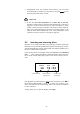
Close the disc drawer. The display reads now Close and then Reading
disc.... After reading the table of contents the display shows the num-
ber of tracks and the total playing time of the disc in minutes and sec-
onds:
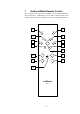
Stop playback by pressing the key stop on the front panel or key < of
the Audionet Metal Remote Control RC 1, before you open the cover.
Please wait until the disc stops turning, before you remove the stabilizer
to remove the disc.
As long as the cover is open the display reads Open.
number of tracks
minutes of total
playing time
seconds of total
playing time