
Specifications




22
3.3. Maps SD card and GPS signal:
Once you have insert the Maps SD card, we have to setup the route of the executable file (.exe), follow the next
steps:
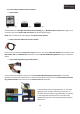
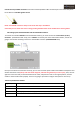
Push on Settings, then in Navigate Setup, uncheck the auto initialitzation software option, and push on the folder
icon.
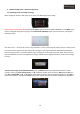
Once you have pressed the folder icon, you must search for the .exe file of the SD card, use the menu arrows to
move through it, and push OK button to confirm you selection, once you have done this action, it will appear the
selected route, then push the X in the right top corner of the screen to go back to the Main Menu of the GPS Box
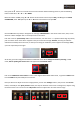
Once you are in the Main Menu push on the Navigation icon to access to the SD card maps