
Specifications



13
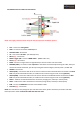
2.6. GPS Box installation and connections:
• GPS: Antenna GPS connection port
• USB: USB devices connection port
• POWER & DATA: Connection and supply cables connection port
• RESET: Press this button to reset GPS Box to default factory settings
• RGB – AV: Switcher to switch between video modes, RGB or composite video
• PWR: LED light that indicates if GPS Box is working
• CA: No function
• SD: SD card connection port (Maps, Multimedia…)
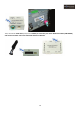
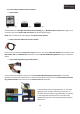
GPS antenna:
NOTE: Place preferably the antenna on the “dark” zone of the car’s front glass, it will be necessary to disassemble
one of the A pilar trims.
Connect to the GPS antenna port of the interface GPS Box
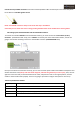
Hidden microphone specific for locate at overhead courtesy lights panel:
Connect to the 3.5 Jack connector (green) of the connection cables and power supplying of the GPS Box (if we are
going to use it).