
Diamond Storage Array Installation, Operations, Maintenance Manual
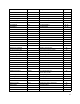

Table Of Contents
- Preface
- 1.0 Diamond Storage Array Product Overview
- 2.0 Diamond Storage Array Technical Overview
- 3.0 Installation Instructions
- 3.2 Physical Set Up
- 4.0 Determining Drive and Sled Designations
- 5.0 Accessing the Array
- Command Line Interface
- ATTO ExpressNAV
- In-band SCSI over Fibre Channel
- RS-232 port
- Ethernet port
- SNMP
- I/O details
- Browser compatibility
- Opening an ExpressNAV session
- Navigating ExpressNAV
- Exhibit 5.4-1 Atypical page in the ATTO ExpressNAV configuration tool.
- Status
- Ethernet
- SNMP
- Serial Port
- Fibre Channel
- Storage Management
- RAID
- Clear Data
- Logical Units
- Rebuild
- Configuration
- Advanced
- Restart
- Help
- FirmwareRestart
- Help
- RestoreConfiguration
- SaveConfiguration
- SystemSN
- VerboseMode
- EthernetSpeed
- FTPPassword
- IPAddress
- IPDHCP
- IPGateway
- IPSubnetMask
- SNMPTrapAddress
- SNMPTraps
- SNMPUpdates
- TelnetPassword
- TelnetTimeout
- TelnetUsername
- FcConnMode
- FcDataRate
- FcFairArb
- FcFrameLength
- FcFullDuplex
- FcHard
- FcHardAddress
- FcNodeName
- FcPortInfo
- FcPortList
- FcPortName
- FcWWName
- SerialPortBaudRate
- SerialPortEcho
- SerialPortHandshake
- SerialPortStopBits
- AudibleAlarm
- DiamondModel
- DiamondName
- DriveCopyStatus
- DriveInfo
- FcNodeName
- FcPortList
- FcPortName
- Help
- IdentifyDiamond
- Info
- LUNInfo
- SerialNumber
- SledFaultLED
- SMARTData
- Temperature
- VirtualDriveInfo
- FcScsiBusyStatus
- FirmwareRestart
- MaxEnclTempAlrm
- MinEnclTempAlrm
- Temperature
- Zmodem
- ATADiskState
- AutoRebuild
- ClearDiskReservedAreaData
- DriveCopy
- DriveCopyHalt
- DriveCopyResume
- DriveCopyStatus
- DriveInfo
- DriveSledPower
- DriveWipe
- IdeTransferRate
- LUNInfo
- LUNState
- QuickRAID0
- QuickRAID1
- QuickRAID5
- QuickRAID10
- RAID5ClearData
- RAID5ClearDataStatus
- RAIDInterleave
- RAIDHaltRebuild
- RAIDManualRebuild
- RAIDRebuildState
- RAIDRebuildStatus
- RAIDResumeRebuild
- RebuildPriority
- ResolveLUNConflicts
- RestoreModePages
- SledFaultLED
- VirtualDriveInfo
- 6.0 Configuring Drives
- JBOD (Just a Bunch of Disks)
- RAID Level 0
- RAID Level 1
- RAID Level 10
- RAID Level 5
- Interleave
- Hot Spare sleds
- Enhancing performance
- Sled-based versus disk-based
- Exhibit 6.2-1 Sled-based QuickRAID0 stripe groups with LUN designations in a fully populated Array set up as QuickRAID0 6 sled. If sled 6 were to be withdrawn from the array, LUN 3 (grayed boxes) would be unavailable.
- Exhibit 6.2-2 Drive-based QuickRAID0 stripe groups with LUN designations in a fully populated Array set up as QuickRAID0 6 Drive. If sled 6 were to be withdrawn from the array, LUNs 2 and 5 would be unavailable.
- Exhibit 6.2-3 Configurations of a fully populated Diamond Storage Array in RAID Level 0.
- Exhibit 6.3-1 Drive sleds, LUNs and mirror partners in a RAID Level 1 configuration.
- Hot Spare sleds
- Configuring a fully-populated array
- Configuring a partially-populated array
- Removing RAID groups
- Hot Spare sleds
- 7.0 Hardware Maintenance
- 8.0 Copying Drives
- 9.0 Updating Firmware
- 10.0 System Monitoring and Reporting
- RS-232 monitoring port and CLI
- Ethernet monitoring port and CLI
- Power On Self Test (POST)
- Ready LED
- Audible alarm
- Thermal monitoring
- Power supply monitoring
- System fault LED and error codes
- Disk drive activity and disk fault LEDs
- Windows 2000 special instructions
- Error messages
- Specific situations and suggestions
- Default
- Factory Default
- Appendix A ATA Disk Technology
- Appendix B Information Commands Results
- Appendix C Product Safety
- Appendix D Specifications
- Appendix E Warranty

32
IPSubnetMask 255.255.255.0 Set IPSubnetMask 255.255.255.0 35
LUNInfo LUNInfo 1 41, 46
LUNState Online Get LunState 1 46
MaxEnclTempAlrm 47 Get MaxEnclTempAlrm 43
MinEnclTempAlrm 5 Set MinEnclTempAlrm 10 43
PowerAudibleAlarm Enabled Set PowerAudibleAlarm disabled 43
QuickRAID0 sled Set QuickRAID0 6 46, 53
QuickRAID1 Set QuickRAID1 45, 57
QuickRAID10 Set QuickRAID10 2 46, 63
QuickRAID5 Set QuickRAID5 4 46
RAID5ClearData RAID5ClearData 47
RAID5ClearDataStatus RAID5ClearDataStatus 47
RAIDHaltRebuild RAIDHaltRebuild 3 47
RAIDInterleave 128 Get RAIDInterleave 47, 65
RAIDManualRebuild RAIDManualRebuild 2 3 47
RAIDRebuildState set RAIDRebuildState 2 OK 47
RAIDRebuildStatus get RAIDRebuildStatus 47
RAIDResumeRebuild RAIDResumeRebuild 5 47
RestoreConfiguration RestoreConfiguration default 33
RestoreModePages RestoreModePages 47
SaveConfiguration SaveConfiguration restart 33
SerialNumber Get SerialNumber 33
SerialPortBaudRate 115200 Set SerialPortBaudRate 9600 39
SerialPortEcho Disabled Get SerialPortEcho 39
SerialPortHandshake None Get SerialPortHandshake 39
SerialPortStopBits 1 Set SerialPortStopBits 1 39
SledFaultLED Set SledFaultLED 9 on 42, 48
SMARTData SMARTData 2 1 41
SNMPTrapAddress 10.0.0.1 Set snmptrapaddress 1
255.555.555.555 All
35
SNMPTraps Disabled Get snmptraps 35
SNMPUpdates Disabled Get snmpupdates 35
TelnetPassword diamond Set TelnetPassword 123ABC 36
TelnetTimeout Disabled Set TelnetTimeout 360 36
TelnetUsername telnet Set TelnetUsername diamond1 36
Temperature Get Temperature 43
VerboseMode Enabled Get VerboseMode 33
Zmodem Zmodem receive 43
Command Defaults Example Page