
Diamond Storage Array Installation, Operations, Maintenance Manual
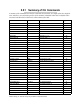
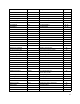

Table Of Contents
- Preface
- 1.0 Diamond Storage Array Product Overview
- 2.0 Diamond Storage Array Technical Overview
- 3.0 Installation Instructions
- 3.2 Physical Set Up
- 4.0 Determining Drive and Sled Designations
- 5.0 Accessing the Array
- Command Line Interface
- ATTO ExpressNAV
- In-band SCSI over Fibre Channel
- RS-232 port
- Ethernet port
- SNMP
- I/O details
- Browser compatibility
- Opening an ExpressNAV session
- Navigating ExpressNAV
- Exhibit 5.4-1 Atypical page in the ATTO ExpressNAV configuration tool.
- Status
- Ethernet
- SNMP
- Serial Port
- Fibre Channel
- Storage Management
- RAID
- Clear Data
- Logical Units
- Rebuild
- Configuration
- Advanced
- Restart
- Help
- FirmwareRestart
- Help
- RestoreConfiguration
- SaveConfiguration
- SystemSN
- VerboseMode
- EthernetSpeed
- FTPPassword
- IPAddress
- IPDHCP
- IPGateway
- IPSubnetMask
- SNMPTrapAddress
- SNMPTraps
- SNMPUpdates
- TelnetPassword
- TelnetTimeout
- TelnetUsername
- FcConnMode
- FcDataRate
- FcFairArb
- FcFrameLength
- FcFullDuplex
- FcHard
- FcHardAddress
- FcNodeName
- FcPortInfo
- FcPortList
- FcPortName
- FcWWName
- SerialPortBaudRate
- SerialPortEcho
- SerialPortHandshake
- SerialPortStopBits
- AudibleAlarm
- DiamondModel
- DiamondName
- DriveCopyStatus
- DriveInfo
- FcNodeName
- FcPortList
- FcPortName
- Help
- IdentifyDiamond
- Info
- LUNInfo
- SerialNumber
- SledFaultLED
- SMARTData
- Temperature
- VirtualDriveInfo
- FcScsiBusyStatus
- FirmwareRestart
- MaxEnclTempAlrm
- MinEnclTempAlrm
- Temperature
- Zmodem
- ATADiskState
- AutoRebuild
- ClearDiskReservedAreaData
- DriveCopy
- DriveCopyHalt
- DriveCopyResume
- DriveCopyStatus
- DriveInfo
- DriveSledPower
- DriveWipe
- IdeTransferRate
- LUNInfo
- LUNState
- QuickRAID0
- QuickRAID1
- QuickRAID5
- QuickRAID10
- RAID5ClearData
- RAID5ClearDataStatus
- RAIDInterleave
- RAIDHaltRebuild
- RAIDManualRebuild
- RAIDRebuildState
- RAIDRebuildStatus
- RAIDResumeRebuild
- RebuildPriority
- ResolveLUNConflicts
- RestoreModePages
- SledFaultLED
- VirtualDriveInfo
- 6.0 Configuring Drives
- JBOD (Just a Bunch of Disks)
- RAID Level 0
- RAID Level 1
- RAID Level 10
- RAID Level 5
- Interleave
- Hot Spare sleds
- Enhancing performance
- Sled-based versus disk-based
- Exhibit 6.2-1 Sled-based QuickRAID0 stripe groups with LUN designations in a fully populated Array set up as QuickRAID0 6 sled. If sled 6 were to be withdrawn from the array, LUN 3 (grayed boxes) would be unavailable.
- Exhibit 6.2-2 Drive-based QuickRAID0 stripe groups with LUN designations in a fully populated Array set up as QuickRAID0 6 Drive. If sled 6 were to be withdrawn from the array, LUNs 2 and 5 would be unavailable.
- Exhibit 6.2-3 Configurations of a fully populated Diamond Storage Array in RAID Level 0.
- Exhibit 6.3-1 Drive sleds, LUNs and mirror partners in a RAID Level 1 configuration.
- Hot Spare sleds
- Configuring a fully-populated array
- Configuring a partially-populated array
- Removing RAID groups
- Hot Spare sleds
- 7.0 Hardware Maintenance
- 8.0 Copying Drives
- 9.0 Updating Firmware
- 10.0 System Monitoring and Reporting
- RS-232 monitoring port and CLI
- Ethernet monitoring port and CLI
- Power On Self Test (POST)
- Ready LED
- Audible alarm
- Thermal monitoring
- Power supply monitoring
- System fault LED and error codes
- Disk drive activity and disk fault LEDs
- Windows 2000 special instructions
- Error messages
- Specific situations and suggestions
- Default
- Factory Default
- Appendix A ATA Disk Technology
- Appendix B Information Commands Results
- Appendix C Product Safety
- Appendix D Specifications
- Appendix E Warranty

31
ATTO Technology Inc. Diamond Storage Array Installation and Operation Manual
5.5.1 Summary of CLI Commands
A summary of the Command Line Interface commands, their defaults, an example of how they might be
used, and where you can find the specifics of the command. Commands which have no default values
associated with them have a blank entry in that column of the table.
Command Defaults Example Page
AtaDiskState Online Set AtaDiskState 6 1 offline 45
AudibleAlarm Disabled Set AudibleAlarm disabled 41
AutoRebuild Disabled Set AutoRebuild enabled 45
ClearDiskReservedArea ClearDiskReservedArea 8 2 45
DiamondModel Diamond Get DiamondModel 41
DiamondName “
...............
” Get DiamondName 41
DriveCopy DriveCopy 1 1 2 2 45
DriveCopyHalt DriveCopyHalt 2 2 45
DriveCopyResume DriveCopyResume 2 2 45
DriveCopyStatus DriveCopyStatus 41
DriveInfo DriveInfo 3 2 41, 45
DriveSledPower On Set DriveSledPower 9 1 off 45
DriveWipe DriveWipe 2 2 46
EthernetSpeed Auto Set EthernetSpeed 100 35
FcConnMode Loop Get FcConnMode 37
FcDataRate Auto Set FcDataRate 2 gigabit 37
FcFairArb Enabled Get FcFairArb 37
FcFrameLength 2048 Get FcFrameLength 37
FcFullDuplex Enabled Set FcFullDuplex enabled 37
FcHard Disabled Get FcHard 37
FcHardAddress 0x03, 0x04 Get FcHardAddress 0 37
FcPortInfo Get FcPortInfo 37
FcPortList FcPortList 41, 38
FcPortName Get FcPortName 1 41
FcWWName Get FcWWName 0 38
FirmwareRestart FirmwareRestart 33, 43
FTPPassword diamond Set FTPPassword barbw52 35
Help Help DriveInfo 33
IdentifyDiamond Disabled Get IdentifyDiamond 41
IdeTransferRate 4 Set IdeTransferRate 4 46
Info Info 41
IPAddress 10.0.0.1 Set IPAddress 10.0.0.02 35
IPDHCP Disabled Set IPDHCP enabled 35
IPGateway 0.0.0.0 Set IPGateway 200.10.22.3 35