
Diamond Storage Array Installation, Operations, Maintenance Manual

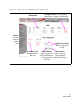
Table Of Contents
- Preface
- 1.0 Diamond Storage Array Product Overview
- 2.0 Diamond Storage Array Technical Overview
- 3.0 Installation Instructions
- 3.2 Physical Set Up
- 4.0 Determining Drive and Sled Designations
- 5.0 Accessing the Array
- Command Line Interface
- ATTO ExpressNAV
- In-band SCSI over Fibre Channel
- RS-232 port
- Ethernet port
- SNMP
- I/O details
- Browser compatibility
- Opening an ExpressNAV session
- Navigating ExpressNAV
- Exhibit 5.4-1 Atypical page in the ATTO ExpressNAV configuration tool.
- Status
- Ethernet
- SNMP
- Serial Port
- Fibre Channel
- Storage Management
- RAID
- Clear Data
- Logical Units
- Rebuild
- Configuration
- Advanced
- Restart
- Help
- FirmwareRestart
- Help
- RestoreConfiguration
- SaveConfiguration
- SystemSN
- VerboseMode
- EthernetSpeed
- FTPPassword
- IPAddress
- IPDHCP
- IPGateway
- IPSubnetMask
- SNMPTrapAddress
- SNMPTraps
- SNMPUpdates
- TelnetPassword
- TelnetTimeout
- TelnetUsername
- FcConnMode
- FcDataRate
- FcFairArb
- FcFrameLength
- FcFullDuplex
- FcHard
- FcHardAddress
- FcNodeName
- FcPortInfo
- FcPortList
- FcPortName
- FcWWName
- SerialPortBaudRate
- SerialPortEcho
- SerialPortHandshake
- SerialPortStopBits
- AudibleAlarm
- DiamondModel
- DiamondName
- DriveCopyStatus
- DriveInfo
- FcNodeName
- FcPortList
- FcPortName
- Help
- IdentifyDiamond
- Info
- LUNInfo
- SerialNumber
- SledFaultLED
- SMARTData
- Temperature
- VirtualDriveInfo
- FcScsiBusyStatus
- FirmwareRestart
- MaxEnclTempAlrm
- MinEnclTempAlrm
- Temperature
- Zmodem
- ATADiskState
- AutoRebuild
- ClearDiskReservedAreaData
- DriveCopy
- DriveCopyHalt
- DriveCopyResume
- DriveCopyStatus
- DriveInfo
- DriveSledPower
- DriveWipe
- IdeTransferRate
- LUNInfo
- LUNState
- QuickRAID0
- QuickRAID1
- QuickRAID5
- QuickRAID10
- RAID5ClearData
- RAID5ClearDataStatus
- RAIDInterleave
- RAIDHaltRebuild
- RAIDManualRebuild
- RAIDRebuildState
- RAIDRebuildStatus
- RAIDResumeRebuild
- RebuildPriority
- ResolveLUNConflicts
- RestoreModePages
- SledFaultLED
- VirtualDriveInfo
- 6.0 Configuring Drives
- JBOD (Just a Bunch of Disks)
- RAID Level 0
- RAID Level 1
- RAID Level 10
- RAID Level 5
- Interleave
- Hot Spare sleds
- Enhancing performance
- Sled-based versus disk-based
- Exhibit 6.2-1 Sled-based QuickRAID0 stripe groups with LUN designations in a fully populated Array set up as QuickRAID0 6 sled. If sled 6 were to be withdrawn from the array, LUN 3 (grayed boxes) would be unavailable.
- Exhibit 6.2-2 Drive-based QuickRAID0 stripe groups with LUN designations in a fully populated Array set up as QuickRAID0 6 Drive. If sled 6 were to be withdrawn from the array, LUNs 2 and 5 would be unavailable.
- Exhibit 6.2-3 Configurations of a fully populated Diamond Storage Array in RAID Level 0.
- Exhibit 6.3-1 Drive sleds, LUNs and mirror partners in a RAID Level 1 configuration.
- Hot Spare sleds
- Configuring a fully-populated array
- Configuring a partially-populated array
- Removing RAID groups
- Hot Spare sleds
- 7.0 Hardware Maintenance
- 8.0 Copying Drives
- 9.0 Updating Firmware
- 10.0 System Monitoring and Reporting
- RS-232 monitoring port and CLI
- Ethernet monitoring port and CLI
- Power On Self Test (POST)
- Ready LED
- Audible alarm
- Thermal monitoring
- Power supply monitoring
- System fault LED and error codes
- Disk drive activity and disk fault LEDs
- Windows 2000 special instructions
- Error messages
- Specific situations and suggestions
- Default
- Factory Default
- Appendix A ATA Disk Technology
- Appendix B Information Commands Results
- Appendix C Product Safety
- Appendix D Specifications
- Appendix E Warranty

29
ATTO Technology Inc. Diamond Storage Array Installation and Operation Manual
5.5 Command Line Interface Use and Guidance
The command line interface (CLI) provides access to Diamond Storage Array services through a set of
ASCII-based commands. CLI commands may be entered while in CLI mode or through the Advanced
CLI page in the ExpressNAV interface.
• CLI commands are context sensitive and
generally follow a standard format
[Get | Set] Command [Parameter 1 |
Parameter 2]
followed by the
return
or
enter
key
• CLI commands are not case sensitive: you may
type all upper or all lower case or a mixture, no
matter what the definition either in Help
or these
pages states. Upper and lower case in this
manual and the
help
screen are for clarification
only.
• Commands generally have three types of
operation: get, set and immediate as
summarized below.
The
get
form returns the value of a parameter or
setting and is an informational command.
Responses to get commands are specified in the
Results
field for each command, followed by
Ready.
The
set
form is an action that changes the value of
a parameter or configuration setting. It may
require a
SaveConfiguration
command and a
system restart before changes are implemented.
The restart can be accomplished as part of the
SaveConfiguration
command or by using a separate
FirmwareRestart
command. A number of set
commands may be issued before the
SaveConfiguration
command.
Responses to set commands are either an error
message or
Ready. *,
which indicates a
SaveConfiguration
command is required.
Set
commands which do not require a
SaveConfiguration
command, defined as
Immediate
commands, are immediately
implemented.
Responses to Immediate commands are either an
error message or
Ready
.
Symbols, typefaces and abbreviations used to
indicate functions and elements of the command
line interface used in this manual are listed below.
Command Line Interface actions and responses
Set commands configure the Diamond Storage Array and display what you have changed after
completing the task. Commands which require a
SaveConfiguration
command to complete their
implementation will return Ready
. *
. Set commands which do not require a SaveConfiguration
command are immediately implemented.
Get commands display information about the configuration of the Diamond Storage Array.
Responses to get commands are followed by Ready
.
Screen messages, also called returns, may be either terse, with just the current information, or
verbose, with labels and the current information. Default is verbose.