
Diamond Storage Array Installation, Operations, Maintenance Manual

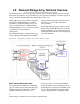
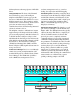

Table Of Contents
- Preface
- 1.0 Diamond Storage Array Product Overview
- 2.0 Diamond Storage Array Technical Overview
- 3.0 Installation Instructions
- 3.2 Physical Set Up
- 4.0 Determining Drive and Sled Designations
- 5.0 Accessing the Array
- Command Line Interface
- ATTO ExpressNAV
- In-band SCSI over Fibre Channel
- RS-232 port
- Ethernet port
- SNMP
- I/O details
- Browser compatibility
- Opening an ExpressNAV session
- Navigating ExpressNAV
- Exhibit 5.4-1 Atypical page in the ATTO ExpressNAV configuration tool.
- Status
- Ethernet
- SNMP
- Serial Port
- Fibre Channel
- Storage Management
- RAID
- Clear Data
- Logical Units
- Rebuild
- Configuration
- Advanced
- Restart
- Help
- FirmwareRestart
- Help
- RestoreConfiguration
- SaveConfiguration
- SystemSN
- VerboseMode
- EthernetSpeed
- FTPPassword
- IPAddress
- IPDHCP
- IPGateway
- IPSubnetMask
- SNMPTrapAddress
- SNMPTraps
- SNMPUpdates
- TelnetPassword
- TelnetTimeout
- TelnetUsername
- FcConnMode
- FcDataRate
- FcFairArb
- FcFrameLength
- FcFullDuplex
- FcHard
- FcHardAddress
- FcNodeName
- FcPortInfo
- FcPortList
- FcPortName
- FcWWName
- SerialPortBaudRate
- SerialPortEcho
- SerialPortHandshake
- SerialPortStopBits
- AudibleAlarm
- DiamondModel
- DiamondName
- DriveCopyStatus
- DriveInfo
- FcNodeName
- FcPortList
- FcPortName
- Help
- IdentifyDiamond
- Info
- LUNInfo
- SerialNumber
- SledFaultLED
- SMARTData
- Temperature
- VirtualDriveInfo
- FcScsiBusyStatus
- FirmwareRestart
- MaxEnclTempAlrm
- MinEnclTempAlrm
- Temperature
- Zmodem
- ATADiskState
- AutoRebuild
- ClearDiskReservedAreaData
- DriveCopy
- DriveCopyHalt
- DriveCopyResume
- DriveCopyStatus
- DriveInfo
- DriveSledPower
- DriveWipe
- IdeTransferRate
- LUNInfo
- LUNState
- QuickRAID0
- QuickRAID1
- QuickRAID5
- QuickRAID10
- RAID5ClearData
- RAID5ClearDataStatus
- RAIDInterleave
- RAIDHaltRebuild
- RAIDManualRebuild
- RAIDRebuildState
- RAIDRebuildStatus
- RAIDResumeRebuild
- RebuildPriority
- ResolveLUNConflicts
- RestoreModePages
- SledFaultLED
- VirtualDriveInfo
- 6.0 Configuring Drives
- JBOD (Just a Bunch of Disks)
- RAID Level 0
- RAID Level 1
- RAID Level 10
- RAID Level 5
- Interleave
- Hot Spare sleds
- Enhancing performance
- Sled-based versus disk-based
- Exhibit 6.2-1 Sled-based QuickRAID0 stripe groups with LUN designations in a fully populated Array set up as QuickRAID0 6 sled. If sled 6 were to be withdrawn from the array, LUN 3 (grayed boxes) would be unavailable.
- Exhibit 6.2-2 Drive-based QuickRAID0 stripe groups with LUN designations in a fully populated Array set up as QuickRAID0 6 Drive. If sled 6 were to be withdrawn from the array, LUNs 2 and 5 would be unavailable.
- Exhibit 6.2-3 Configurations of a fully populated Diamond Storage Array in RAID Level 0.
- Exhibit 6.3-1 Drive sleds, LUNs and mirror partners in a RAID Level 1 configuration.
- Hot Spare sleds
- Configuring a fully-populated array
- Configuring a partially-populated array
- Removing RAID groups
- Hot Spare sleds
- 7.0 Hardware Maintenance
- 8.0 Copying Drives
- 9.0 Updating Firmware
- 10.0 System Monitoring and Reporting
- RS-232 monitoring port and CLI
- Ethernet monitoring port and CLI
- Power On Self Test (POST)
- Ready LED
- Audible alarm
- Thermal monitoring
- Power supply monitoring
- System fault LED and error codes
- Disk drive activity and disk fault LEDs
- Windows 2000 special instructions
- Error messages
- Specific situations and suggestions
- Default
- Factory Default
- Appendix A ATA Disk Technology
- Appendix B Information Commands Results
- Appendix C Product Safety
- Appendix D Specifications
- Appendix E Warranty

4
disk array that uses the merged power of ATA disk
drives.
Intelligent Midplane
The heart of the Diamond
Series disk storage array is the intelligent
midplane with ADXT
to sum or
aggregate
the
data rates of individual ATA disk drives to create
high data transfer rates. This technology enables
features such as serverless backup, advanced error
protection, metadata storage techniques,
virtualization software, thermal management and
advanced enclosure services.
The midplane contains a combination of custom
Application Specific Integrated Circuits (ASICs),
processors and proprietary embedded software. It
is divided into three main processing sections
which handle the data being read or written to the
ATA disk drives from the Fibre Channel or SCSI
host interfaces. The Virtual Device Manager
(VDM), Data Routing Fabric (DRF) and ATA
Interface Engines (AIE) organize data streams for
storage or retrieval.
Virtual Device Manager
Data is accessed through
virtual devices using an implementation of the
standard SCSI protocol controlled by the Virtual
Device Manager. The VDM adds capabilities
such as RAID, data management services,
enclosure management services, serverless
backup, data replication and LUN mapping.
Data Routing Fabric
Incoming or outgoing data is
routed between the ATA Interface Engines (AIE)
and the Fibre Channel or SCSI interface by the
custom Data Routing Fabric ASIC, a high speed,
low latency transfer fabric with more than 2
GB/sec. of bandwidth supported by up to 512
Megabytes of memory.
ATA Interface Engine (AIE)
The interface to each
pair of drives is through a custom ATA Interface
Engine ASIC. The AIE implements the typically
software-intensive ATA interface completely in
silicon. Each AIE contains a dedicated ATA
protocol processor to completely automate
command and protocol processing. Automated
command overlapping and queuing maximizes
the performance of multi-threaded I/O. The AIE
transfers data using double-clocking technology
at 66 megabytes per second. The Diamond
Storage Array contains 12 AIEs for a parallel
transfer rate of 792 megabytes per second. In
addition to guaranteeing data transfer integrity
with automatic CRC checking, the command and
status transfers are validated using a patent
pending technology unique to the AIE.
text
Disk 1
Disk 2
AIE
1
Disk 1
Disk 2
Disk 1
Disk 2
Disk 1
Disk 2
Disk 1
Disk 2
Disk 1
Disk 2
Disk 1
Disk 2
Disk 1
Disk 2
Disk 1
Disk 2
Disk 1
Disk 2
Disk 1
Disk 2
Disk 1
Disk 2
DATA ROUTING FABRIC
VIRTUAL DEVICE MANAGER
FIBRECHANNEL
INTERFACE 1
FIBRECHANNEL
INTERFACE 2
AIE
2
AIE
3
AIE
4
AIE
5
AIE
6
AIE
7
AIE
8
AIE
9
AIE
10
AIE
11
AIE
12