
Router ADSL User's Manual

WEBSHARE 241
7
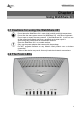
LED Meaning
PWR
Lights when power ON.
SYS
Lights when system is ready.
LAN
Lights when connected to Ethernet device:
• Green for 100Mbps; Orange for 10Mbps
• Blinking when data transmit/received.
ADSL
Lights when successfully connected to an ADSL DSLAM.
PPP
Steady glow when there is a PPPoA / PPPoE connection.
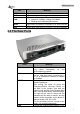
2.3 The Rear Ports
PORT Meaning
ADSL
Connect the supplied RJ-11 cable to this
port when connecting to the
ADSL/telephone network.
LAN
Connect an UTP Ethernet cable to one of
the four LAN ports when connecting to a
PC or an office/home network of 10Mbps
or 100Mbps.
RESET
Recovery procedures for a lost web
interface password:
After turning the router on press the
Emergency/Failure Recovery Button on
the back of the modem, and hold the
button in until all lights on the modem flash
and it reboots with factory default settings.
The login will be reset to admin and the
password will be reset to atlantis, and the
modem will be accessible via its default IP
address at http://192.168.1.254/
This is used when you can not login to the
router, e.g. forgot the password)
PWR
Connect the supplied power adapter to this