
Switch User Manual
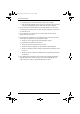
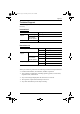
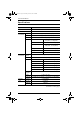
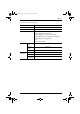
Table Of Contents
- CS1782 User Manual
- Package Contents
- Introduction
- Hardware Setup
- Basic Operation
- Keyboard Port Operation
- Port Switching
- Hotkey Setting Mode
- Invoking HSM
- Alternate HSM Invocation Keys
- Alternate Port Switching Keys
- Keyboard Operating Platform
- List Hotkey Settings
- USB Reset
- Hotkey Beeper Control
- Disable Port Switching Keys
- Firmware Upgrade Mode
- Restore Default Settings
- Display Emulation Technology
- Alternative Manual Port Selection Settings
- Mouse Emulation Control
- Other OS Mode
- HSM Summary Table
- Keyboard Emulation
- The Firmware Upgrade Utility
- Appendix
CS1782 User Manual
34
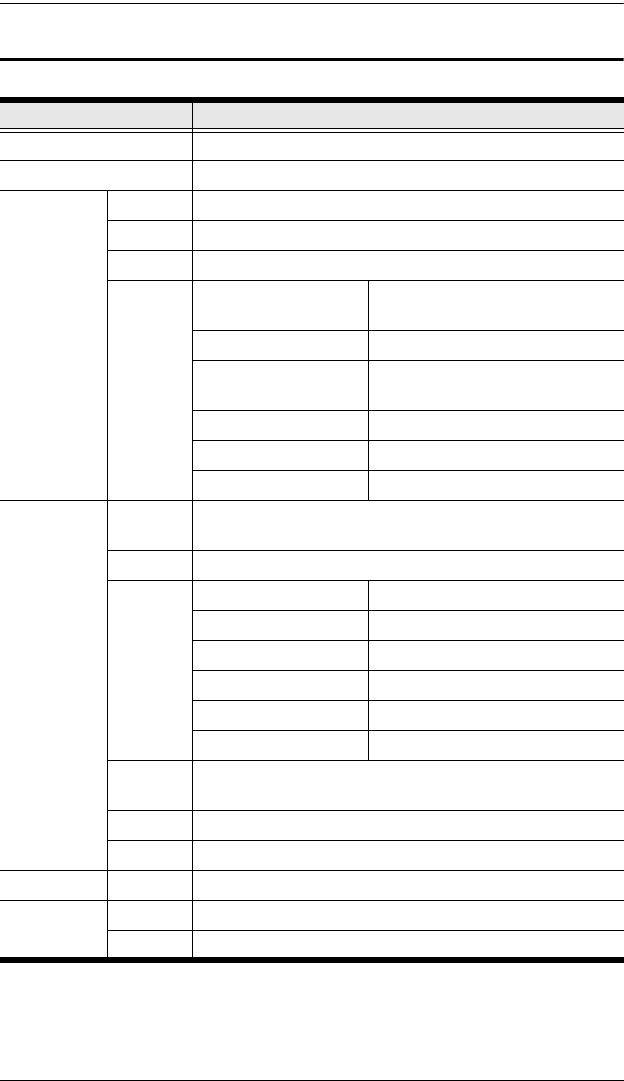
Specifications
(Continues on next page.)
Function CS1782
Computer Connections 2
Port Selection Front Panel Pushbuttons; Hotkey
Console
Connectors
Keyboard 1 x USB Type A F (black, rear panel)
Mouse 1 x USB Type A F (black, rear panel)
Video 1 x DVI-I F (white)
Audio Line Out Port 2 x Mini Stereo Jack F (green; 1 x
front panel, 1 x rear panel
Line In Port 1 x Mini Stereo Jack F (blue)
Microphone Port 2 x Mini Stereo Jack F (pink; 1 x
front panel, 1 x rear panel)
Side Speaker Out Port 1 x Mini Stereo Jack F (gray)
Rear Speaker Out Port 1 x Mini Stereo Jack F (black)
Center/Subwoofer Port 1 x Mini Stereo Jack F (orange)
Computer
Connectors
KB /
Mouse
2 x USB Type B F (white)
Video 2 x DVI-I F (white)
Audio Line Out Port 2 x Mini Stereo Jack F (green)
Line In Port 2 x Mini Stereo Jack F (blue)
Microphone Port 2 x Mini Stereo Jack F (pink)
Side Speaker Out Port 2 x Mini Stereo Jack F (gray)
Rear Speaker Out Port 2 x Mini Stereo Jack F (black)
Center/Subwoofer Port 2 x Mini Stereo Jack F (orange)
F/W
Upgrade
1 x 4-conductor 3.5 mm Jack
Power 1 x DC 5.3V Jack
USB Hub 2 x USB Type A F (white; 1 x front panel; 1 x rear panel)
Switches Selected 2 x Pushbutton
LEDs On Line 2 (Orange)
USB LInk 2 (Green)
cs1782.book Page 34 Thursday, June 12, 2008 2:28 PM