
Switch User Manual
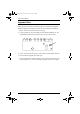
Table Of Contents
- CS1782 User Manual
- Package Contents
- Introduction
- Hardware Setup
- Basic Operation
- Keyboard Port Operation
- Port Switching
- Hotkey Setting Mode
- Invoking HSM
- Alternate HSM Invocation Keys
- Alternate Port Switching Keys
- Keyboard Operating Platform
- List Hotkey Settings
- USB Reset
- Hotkey Beeper Control
- Disable Port Switching Keys
- Firmware Upgrade Mode
- Restore Default Settings
- Display Emulation Technology
- Alternative Manual Port Selection Settings
- Mouse Emulation Control
- Other OS Mode
- HSM Summary Table
- Keyboard Emulation
- The Firmware Upgrade Utility
- Appendix
CS1782 User Manual
30
Upgrade Failed
If the Upgrade Succeeded screen doesn’t appear, it means that the upgrade
failed to complete successfully, in which case you should do the following:
1. Power off the CS1782 and remove its housing.
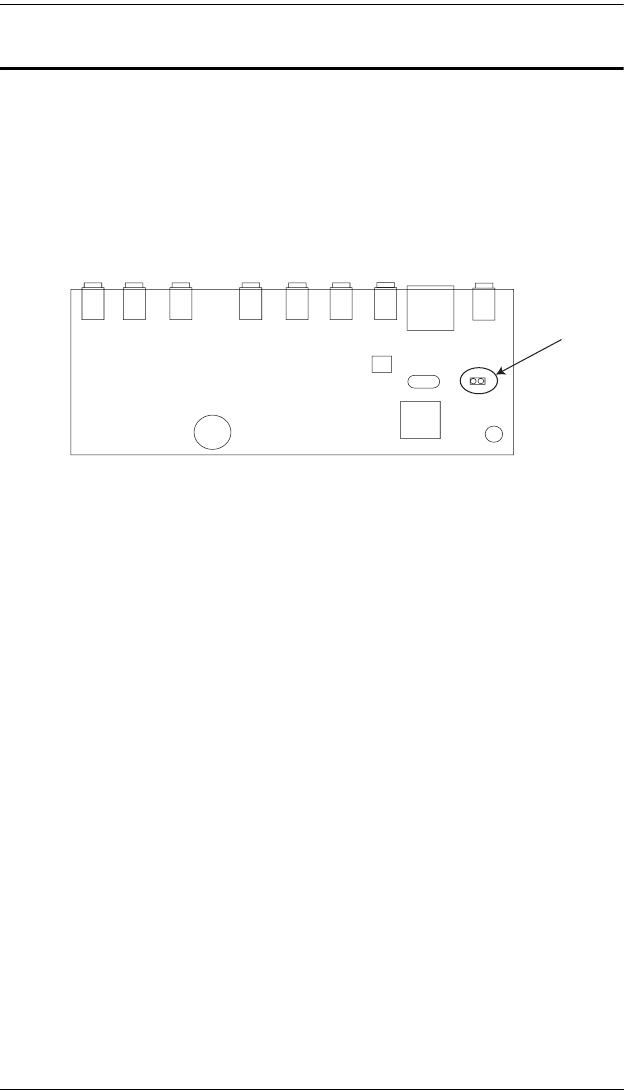
2. Using a jumper cap, short the jumper on the mainboard labeled J17. The
diagram below indicates the jumper location on the CS1782 board:
3. Power on the CS1782. It will now work with the factory default firmware.
4. Do the firmware upgrade procedure again.
5. After the upgrade procedure completes, power off the switch, remove the
jumper cap from J17, close the housing, and power the CS1782 on again.
cs1782.book Page 30 Thursday, June 12, 2008 2:28 PM