
Switch User Manual
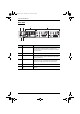
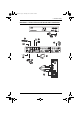
Table Of Contents
- CS1782 User Manual
- Package Contents
- Introduction
- Hardware Setup
- Basic Operation
- Keyboard Port Operation
- Port Switching
- Hotkey Setting Mode
- Invoking HSM
- Alternate HSM Invocation Keys
- Alternate Port Switching Keys
- Keyboard Operating Platform
- List Hotkey Settings
- USB Reset
- Hotkey Beeper Control
- Disable Port Switching Keys
- Firmware Upgrade Mode
- Restore Default Settings
- Display Emulation Technology
- Alternative Manual Port Selection Settings
- Mouse Emulation Control
- Other OS Mode
- HSM Summary Table
- Keyboard Emulation
- The Firmware Upgrade Utility
- Appendix
CS1782 User Manual
6
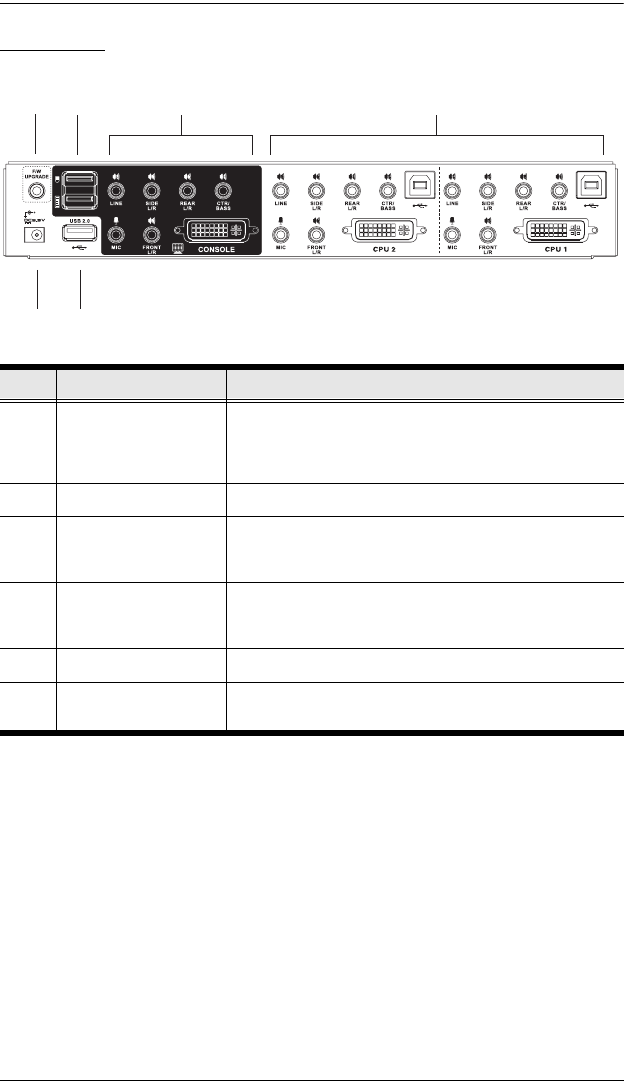
Rear View
No. Component Description
1 Firmware Upgrade Port The Firmware Upgrade Cable that transfers the firmware
upgrade data from the administrator’s computer to the
CS1782 plugs into this connector. See page 23 for firmware
upgrading details.
2 USB Console Ports Your USB keyboard and USB mouse plug in here.
3 Console Port Section The cables from your monitor, microphone, and speakers
plug in here. Each connector is marked with an appropriate
icon to indicate itself.
4 CPU Port Section The cables that link the switch to your computers plug in
here. Each CPU port is comprised of a microphone jack,
speaker jacks, USB type B socket and a DVI connector
5 Power Jack The power adapter cable plugs into this jack.
6 USB 2.0 Peripheral
Port
USB 2.0 peripherals (printers, scanners, etc.) can plug into
this port.
1
2
3
4
5
6
cs1782.book Page 6 Thursday, June 12, 2008 2:28 PM