
Switch User Manual
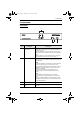
Table Of Contents
- CS1782 User Manual
- Package Contents
- Introduction
- Hardware Setup
- Basic Operation
- Keyboard Port Operation
- Port Switching
- Hotkey Setting Mode
- Invoking HSM
- Alternate HSM Invocation Keys
- Alternate Port Switching Keys
- Keyboard Operating Platform
- List Hotkey Settings
- USB Reset
- Hotkey Beeper Control
- Disable Port Switching Keys
- Firmware Upgrade Mode
- Restore Default Settings
- Display Emulation Technology
- Alternative Manual Port Selection Settings
- Mouse Emulation Control
- Other OS Mode
- HSM Summary Table
- Keyboard Emulation
- The Firmware Upgrade Utility
- Appendix
1. Introduction
5
Components
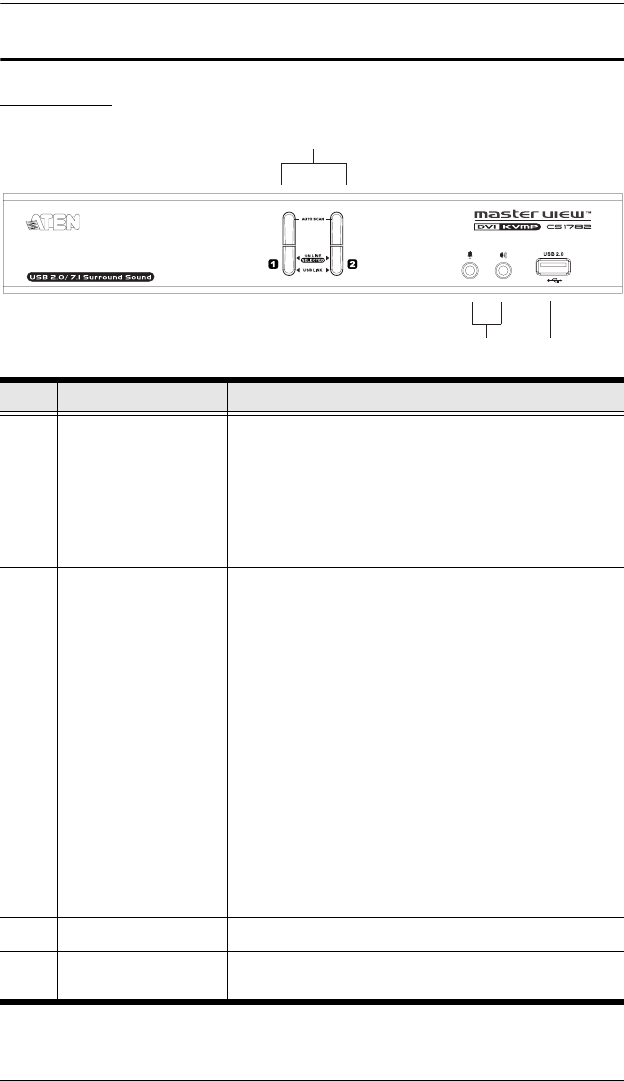
Front View
No. Component Description
1 Port Selection
Pushbuttons
Press a pushbutton for longer than two seconds to bring the
KVM, USB, and audio focus to the computer attached to its
corresponding port
.
Press a pushbutton for less than two seconds to bring only
the KVM focus to the computer attached to its corresponding
port.
Press pushbuttons 1 and 2 simultaneously for 2 seconds to
start Auto Scan Mode. See Auto Scanning, page 13.
2 Port LEDs The Port LEDs are built into the Port Selection Pushbuttons.
The upper ones are the KVM Port LEDs; the lower ones are
the USB LEDs:
KVM
Lights DIM ORANGE to indicate that the computer attached
to the corresponding port is up and running (On Line).
Changes to BRIGHT ORANGE to indicate that the computer
attached to its corresponding port is the one that has the
KVM focus (Selected).
Flashes to indicate that the computer attached to its
corresponding port is being accessed under Auto Scan
mode.
USB
Lights GREEN to indicate that there is a USB cable
connection to the computer attached to its corresponding
port.
Changes to BRIGHT GREEN to indicate that the computer
attached to its corresponding port is the one that has access
to the USB peripherals.
3 Console Ports (Audio) Your speakers and microphone plug in here.
4 USB 2.0 Peripheral
Port
USB 2.0 peripherals (printers, scanners, etc.) can plug into
this port.
1 & 2
3
4
cs1782.book Page 5 Thursday, June 12, 2008 2:28 PM