
- Aten 4-Port Dual Video Dual Link Dvi Kvmp Switch Manual

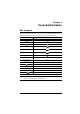


Chapter 4. Keyboard Port Operation
23
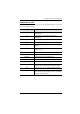
HSM Summary Table
After invoking HSM (see page 18), key in one of the following keys to perform
the corresponding function:
Key Function
[H] Toggles between the default and alternate HSM
invocation keys.
[T] Toggles between the default and alternate Port
Switching keys.
[F2] Enables Mac keyboard emulation.
[F3] Enables Sun keyboard emulation
[F10] Automatically detects and sets the keyboard operating
platform.
[F4] Print the switch’s current settings via a text editor or
word processor.
[F5] Performs a reset on all USB devices.
[B] Toggles the beeper On and Off.
[X] [Enter] Enables/Disables the Port Switching keys.
[R] [Enter] Resets the hotkey settings to their default status.
[upgrade] [Enter] Invokes Firmware Upgrade Mode.
[D] Invokes the Video DynaSync function, which stores the
console monitor’s EDID to optimize display resolution.
[M] Toggles between mouse emulation enable and disable.
[F1] Sets the keyboard and mouse to SPC mode so that it
can work under special operating systems as a standard
(104 key) keyboard and mouse.